How do you play Supermarket Chaos?
Pick up items, read names, find the section, match the price tag text, place, earn coins, upgrade skills. Full loop in the core gameplay section.
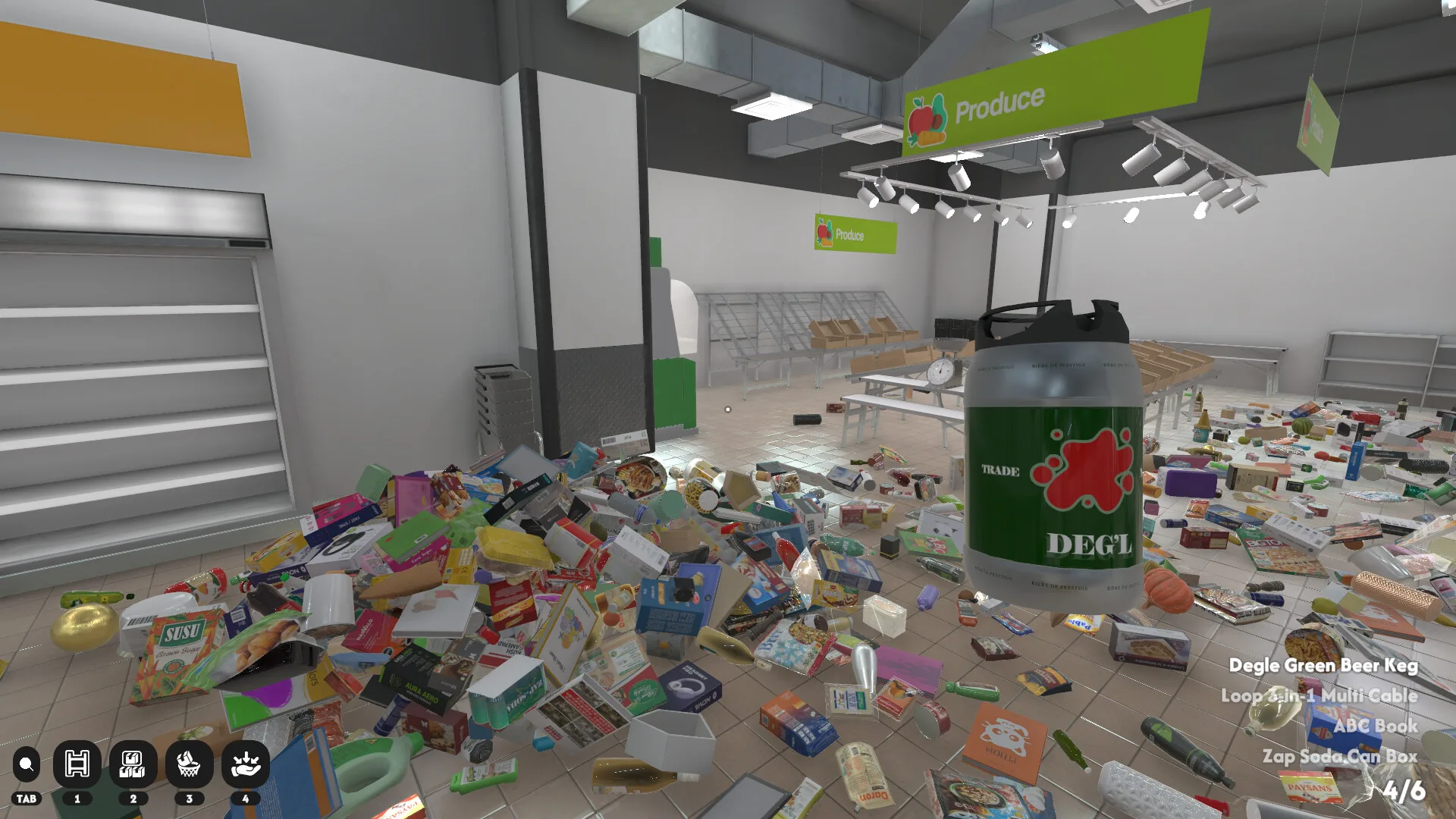
Supermarket Chaos beginner guide — how to play the Steam organizing sim, core loop, price tag rules, first 100 items, controls, and links to items search and achievements.
Supermarket Chaos is a cozy organizing simulator on Steam for PC by BunnyHop, published by BunnyHopHome. Released June 29, 2026, it sits in the same comfort niche as library-tidy sims — but the shelves belong to a supermarket torn apart by GPT-9000, an organizing robot that decided fixed product positions were a lie.
Your job: return 4,668 products to the correct shelves across 16 store sections. There is no timer, no game over, and no combat. Players searching Supermarket Chaos game or how to play Supermarket Chaos on Google usually want this page first — a calm loop of pick up, read the name, match the price tag, earn coins, upgrade skills, and watch chaos become order.
The Steam store lists keyboard, mouse, and full controller support (DualShock and DualSense). Supermarket Chaos is not on Nintendo Switch, mobile, or Roblox — purchase only from the official Steam page (App ID 4800590). Launch price $4.99 with an introductory $4.49 sale at release.
If you played similar tidy sims, you already understand the vibe: first-person walking, grabbing scattered objects, and satisfying snaps when the right tag accepts an item. The twist is scale — thousands of SKUs and overlapping signage — which is why this wiki pairs guides with an item search tool and a chaos list for misleading products.
| Fact | Detail | Beginner takeaway |
|---|---|---|
| Products | 4,668 total | Every one needs a correct tag |
| Sections | 16 store areas | Learn aisles gradually |
| Pressure | None — no fail state | Accuracy beats speed early |
| Progress | Coins + Steam achievements | Track on progress tracker |
Every Supermarket Chaos session follows the same rhythm, whether it is your first product or number 4,668:
Pick up a floor item and read its name on screen — not the 3D model silhouette. Find the section (Fruit, Tea, Frozen Foods, and thirteen others). Locate the price tag whose text exactly matches the product name. Place the item on that tag until it snaps. Earn coins for valid placements. Spend coins on skill upgrades between runs when the skill tree is available.
Wrong placements teach you quickly: the game may highlight shelf rows in white when the tag is right but the row is incomplete, or yellow when a row is correctly filled — always trust the price tag string you are trying to match, not aisle banners that disagree.
Coins fund carry capacity and movement upgrades on the skills guide. Efficient loops matter for Steam achievements like 100 Stocked and the long road to Complete, but Supermarket Chaos never punishes slow play — only inaccurate tags waste time.
When an item refuses to snap, check three things: wrong tag text, wrong section entirely, or a multi-slot frozen product that needs neighboring space cleared first.
| Step | Action | Common mistake | Tool |
|---|---|---|---|
| 1 · Pick up | Read product name | Guessing from model shape | Item search |
| 2 · Section | Walk to correct aisle | Trusting entrance sign only | Sections guide |
| 3 · Price tag | Match exact tag text | Similar but different label | Chaos list |
| 4 · Place | Snap on matching shelf | Forcing into full row | — |
| 5 · Upgrade | Spend coins on skills | Speed before carry | Skills guide |
Matched by build plan, shared topics, and guide progression — not random related links.
Supermarket Chaos achievements guide — full Steam achievements list, milestone order, optional unlock tips, and not-unlocking troubleshooting for the organizing simulator.
Shared focus: steam
Supermarket Chaos chaos list — misleading items, wrong-shelf traps, and price tag fixes when models or signs do not match intuition.
Shared focus: price tag
Supermarket Chaos on Steam supports keyboard + mouse and controllers with standard first-person layout: move, look, interact to pick up, interact again to place. Left-click commonly grabs products in mouse setups — confirm bindings in the settings menu on first launch.
Community patch notes for recent builds mention mouse invert options and sensitivity tweaks. Adjust comfort settings before long stocking sessions, especially if you play on Steam Deck or couch setups with a gamepad.
No complex combo lists or combat inputs exist — this is intentionally boring in the best way. If controls feel wrong after an update, check settings before assuming a bug; verify game files on Steam if bindings reset unexpectedly.
Later skill upgrades can highlight distant tags or products matching the item in your hands — see the skills guide when manual scanning gets tiring in Books or Wine.
Open hour strategy for Supermarket Chaos game newcomers: do not try to clear the entire map. Start with obvious, high-density piles near Fruit, Snacks, and Beverages — tier S sections on our sections guide.
Large items like toilet paper and detergent (Personal Care / Cleaning) are easy wins when you need confidence — shapes stand out, but tags still rule. Batch five pickups early (default carry limit before upgrades), walk once, place repeatedly.
When the floor feels overwhelming, pick one corner and finish every item visible before crossing the store. Route efficiency comes later; first hour is about learning that price tag text is the only authority.
After roughly a dozen successful placements, look for the skill tree or upgrade menu — spend first coins on carry capacity so the next trip moves more products. Movement speed can wait until you know where sections connect.
| Phase | Focus | Section examples | Goal |
|---|---|---|---|
| 0–15 min | Learn pick-up and tag snap | Nearest visible pile | First Stocked achievement |
| 15–45 min | Batch easy aisles | Fruit · Snacks · Beverages | Comfort with loop |
| 45–60 min | First upgrades | Any cleared zone | Carry tier · 100 Stocked path |
Your first measurable milestone is 100 Stocked — a Steam achievement at 100 correct placements. Supermarket Chaos counts cumulative valid tags anywhere in the store; you do not need a fixed world order, only accurate matches.
Clear easy sections first, then expand into Ramen, Tea, and Canned Goods before wandering into Books or Wine. Use the progress tracker to checkbox finished aisles and the achievements guide for the full twelve-achievement roadmap.
Upgrade carry capacity before movement speed in the opening sessions — fewer empty walks beat sprinting between piles you cannot fully carry yet. Optional achievements like Music Duty (change store music at the computer) fit naturally during breaks; they do not block 100 Stocked.
When you hit confusion spikes — usually mid-tier dairy or seafood models — pause and run item search instead of forcing wrong snaps that earn zero coins and zero achievement progress.
Coins arrive only from correct placements. Treat them as skill fuel, not a score to hoard — early carry upgrades pay for themselves in fewer trips across the same floor piles.
After 100 Stocked, read the sections route for easy → mid → hard planning, the skills guide for upgrade order, and the tier list when you want S/A/B labels at a glance. The wiki database indexes items and sections for browse-heavy players.
Long-term goal: Complete at 4,668 placements. That is hours or days of cozy work — save often, use tools when names confuse you, and ignore Google results about unrelated supermarket multiplayer titles.
| Next page | When to open | Why |
|---|---|---|
| Item search | Unknown product name | Instant section + tag |
| Sections guide | After 100 Stocked | Route planning |
| Skills guide | First coins earned | Upgrade priority |
| Achievements guide | Any milestone hunt | Full Steam list |
| Chaos list | Model looks wrong | Misleading items |
Pick up items, read names, find the section, match the price tag text, place, earn coins, upgrade skills. Full loop in the core gameplay section.
No — Steam PC only. Buy from the Steam store page.
4,668 products per Steam. Complete requires every correct placement.
Carry capacity first, then movement speed, then search highlight. See the skills guide.
It is a paid title ($4.99 base). Check the Steam page for current regional pricing and sales.
Use the item search tool or wiki items list.
Matched by build plan, shared topics, and guide progression — not random related links.
All Supermarket Chaos guides — beginner through chaos list.
Shared focus: beginner
Skill upgrade priority and section difficulty tiers.
Natural follow-up after Beginner guide
Local checklist for sections and achievements.
Tool that supports Beginner guide workflows